Technical Overview
Remote Team Collaboration for Design®
Multi-site Collaboration for Autodesk Applications with CloudNAS
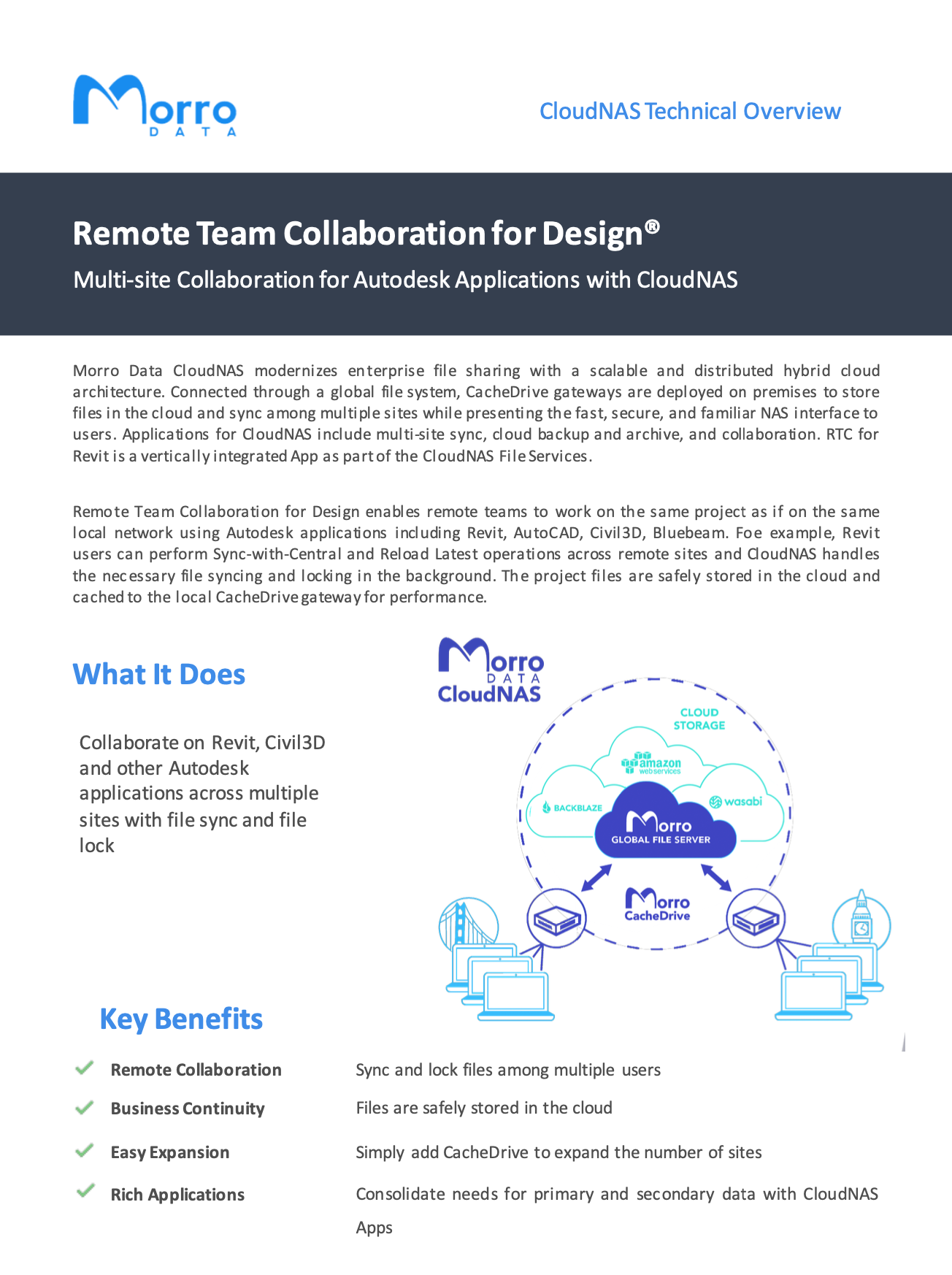
Morro Data CloudNAS modernizes enterprise file sharing with a scalable and distributed hybrid cloud architecture. Connected through a global file system, CacheDrive gateways are deployed on premises to store files in the cloud and sync among multiple sites while presenting the fast, secure, and familiar NAS interface to users. Applications for CloudNAS include multi-site sync, cloud backup and archive, and collaboration. RTC for Revit is a vertically integrated App as part of the CloudNAS File Services.
Remote Team Collaboration for Design enables remote teams to work on the same project as if on the same local network using Autodesk applications including Revit, AutoCAD, Civil3D, Bluebeam. For example, Revit users can perform Sync-with-Central and Reload Latest operations across remote sites and CloudNAS handles the necessary file syncing and locking in the background. The project files are safely stored in the cloud and cached to the local CacheDrive gateway for performance.
Key Benefits
- Remote Collaboration: Sync and lock files among multiple users
- Business Continuity: Files are safely stored in the cloud
- Easy Expansion: Simply add CacheDrive to expand the number of sites
- Rich Applications: Consolidate needs for primary and secondary data with CloudNAS Apps
Did You Know
Morro Global File System
The Morro global file system provides multi-site collaborative file services for sync, lock, transfer, and caching. Interfaces supported include SMB (Windows, Mac) and Web with ACL. At each CacheDrive, users complete unlimited file system is presented as a single namespace.
Object Storage
Morro Data supports S3 compatible object storage including AWS S3 and Azure, presenting a single interface to different storage tiers and cloud providers for collaboration/sync (primary), transfer/replication, backup, and archive.
Global File Services
Consolidated Data Management:
- Unlimited cloud capacity
- Primary + Backup in one global namespace
- Multiple cloud providers to save cost
- Deduped and Encrypted
Multi-Site File Sync and Lock:
- NAS Interface for cloud data. No VPN.
- Global file locking
- Add CacheDrive for fast Disaster Recovery
- Large File Transfer
Cloud-to-Cloud Sync:
- Sync with SharePoint
- Backup to economic cloud storage
- Business Continuity
- User error recovery
Morro Data Features
File Services
Consolidated Data Management
NAS access with cloud reliability for primary and secondary data
Multi-Site Sync
Store files in cloud and sync files locally with cache. Add CacheDrive for easy expansion and instant disaster recovery
Cloud-to-Cloud Sync
Sync and backup SharePoint and other cloud files
Global File System
Global Namespace
Data in cloud and synced across gateways in a single namespace. Gateway cache enables high performance access to unlimited file system
Unlimited Storage
Choice of Cloud Storage providers for primary and secondary data
Storage Pool
Pool specifies where and how data is stored and synced. A pool contains multiple shares. Pool types include Sync, Replicate, and Gateway
Share Access
Network share with user access and gateway access controls
Global File Locking
Lock Office and other application files across gateways for remote collaboration.Remote Team Collaboration for OfficeRemote Team Collaboration for Design
Disaster Recovery
Fast metadata sync for replacement gateway for full file system access
File Versioning
Version control of 1, 3, 30, 300, unlimited versions, or customized versioning policy. Restore prior versions for ransomware recovery
Prefetch
Automatic download to destination gateway vs. on-demand download
Deduplication
Files are de-duplicated to save cloud storage and upload bandwidth
Compression
Files are compressed to save cloud storage and upload bandwidth
Bandwidth Limiting
Control sync window and sync bandwidth per share
Share Mapping
Shares can be optionally mapped to gateways for security
Advanced SMB Share Controls
Options to enable oplocks and to use Extended Attributes to save streams
Share Links
Create a secure link for accessing file(s) or folder(s) to share with external users with a specified expiration
Security
Encryption
Files are encrypted both in transit and at rest in cloud
Access Based Enumeration
Hidden shares
Web Access Security
ACL-based file access permission
User Management
Users and Groups
User and Group access permissions
Active Directory
Supports Microsoft Active Directory and Azure AD
User Permissions
Access permission per user/group/location (read only / RW / no access)
Location Based Permissions
File access based on Gateway (location) and on/off premises
Share Folder Security
Manage shared folder’s ownership and access control list
System Interface
NAS Interface
Present shares the same as NAS, with unlimited capacity
Local Network Interface
Support SMB protocol version 2.0/2.1/3.0/3.1 working with Windows and MacOS clients
Client OS Support
Windows, MAC OSX, Linux, Major Browser
Web Interface
Team Portal for ACL-based file access and management. Upload files and create folders to shares. Manage file versions, download, rename, copy, move, delete, purge files, create share link for files
Morro Cloud Manager
Gateway Management
Globally manage all gateways on MCM
File System Management
Globally manage all shares in a Global Namespace
Dashboard
Usage analytics and system diagram
Analytics
Storage usage, User activities, and Data transfer activities
Role Based Management
Business Admin, Global Admin, Regular User
Users and Groups
Users, Primary Group, Secondary Groups
Logs
By category – team/device/file system. By severity – information/warning/error
Apps
Cloud-to-Cloud Sync
Sync shares with SharePoint document library, Dropbox or OneDrive
Morro Audit
Access history for retrospective investigation
Morro Migrate
Managed data migration to cloud
Morro Duplicate
Morro Duplicate allows users to backup files and permissions from Morro Global File System to an existing on-premises file server or NAS
Slack
Slack integration for Management Alerts
Gateway
CacheDrive Models
Desktop – G80, G80 Pro
Mini-Tower – T600mini
Rackmount 1U – R1100
Virtual Appliance – V200 for Vmware, V201 for Hyper-V, V202 CacheDrive in Cloud, Azure, V203 CacheDrive in Cloud, AWS
Device Information
CacheDrive Model number, serial number, firmware version, IP address, UUID and cache size
Cloud Caching
Files are uploaded to cloud through cache, presenting access window to unlimited file system size
Backup Target
Unlimited backup target through cache
NAS Interface
SMB network share interface same as NAS
Deduplication
Files are de-duplicated on gateway to save upload bandwidth
Compression
Files are compressed on gateway to save upload bandwidth and storage
Encryption
Files are encrypted on gateway before upload
Upload Status
Monitor upload status, speed, remaining upload and files
Prefetch Status
Monitoring prefetch files, status, speed etc.
Advanced Device Option
Hostname and SMB version selection
Device Clock
Global time zone based device clock
Device Management
Shutdown, reboot, and scheduled firmware update from centralized cloud management UI
Green Computing
Low power consumption gateway replacing traditional NAS or file server
Cloud Storage
Amazon S3
US (OR, VA, OH, CA), Canada (Montreal), UK (London), Germany (Frankfurt), Australia, Japan (Tokyo), Singapore, China (Beijing, Ningxia)
Azure Blob
BYOS All Regions
Wasabi
US East (Virginia), US West (Oregon), Japan, BYOS
Backblaze B2
US
RSTOR Cloud Storage
BYOS All Regions
Seagate Lyve Cloud
BYOS All Regions
GET A DEMO